
How Do I Make a Content Calendar for My Small Business?
Build a simple content calendar for your small business in an afternoon: what to put in it, how often to post, which tools are free, and when to get help.

A content calendar is a simple schedule that lists what you will post, where you will post it, and on what day. For a small business it can be a free spreadsheet with six columns, filled in four weeks at a time. The hard part is not the spreadsheet. It is choosing topics from real customer questions and picking a pace you can keep up during your busiest week. This guide walks you through it step by step, and shows where a website and search optimization fit in, which is where we help Michigan business owners at Blue Lake Web Design.
TL;DR
- A content calendar is a schedule of the posts, emails, and web pages you plan to publish. It can live in Google Sheets, a paper planner, or a free project board.
- Start with six columns: date, where it goes, topic, type, status, and what you want the reader to do.
- Pick a pace based on your worst week, not your best one. One steady post a week beats daily posts that stop after a month.
- Take topics from questions customers already ask you on the phone, by email, or at the counter.
- Everything you publish needs a good home. A fast, clear website gives your posts somewhere to send people.
What a content calendar is and why it helps
Content means anything you publish to attract customers: social media posts, blog articles, email newsletters, photos, short videos, and updates on your Google Business Profile (the listing that shows your hours and reviews on Google Search and Maps). A content calendar puts all of it in one place, so you can see what is coming up, what is done, and what is missing.
It can be a spreadsheet, a Google Calendar, or scheduling software. Small businesses have an advantage here. You have less to post than a large company, so everything can fit in a single calendar instead of one per channel.
The benefit is mostly about avoiding scrambles. Without a plan, content tends to become reactive: last-minute requests, posts with no plan for who will see them, and good material that never gets reused. A calendar also gives you time to proofread before something goes live, which cuts down on typos and wrong hours or prices.
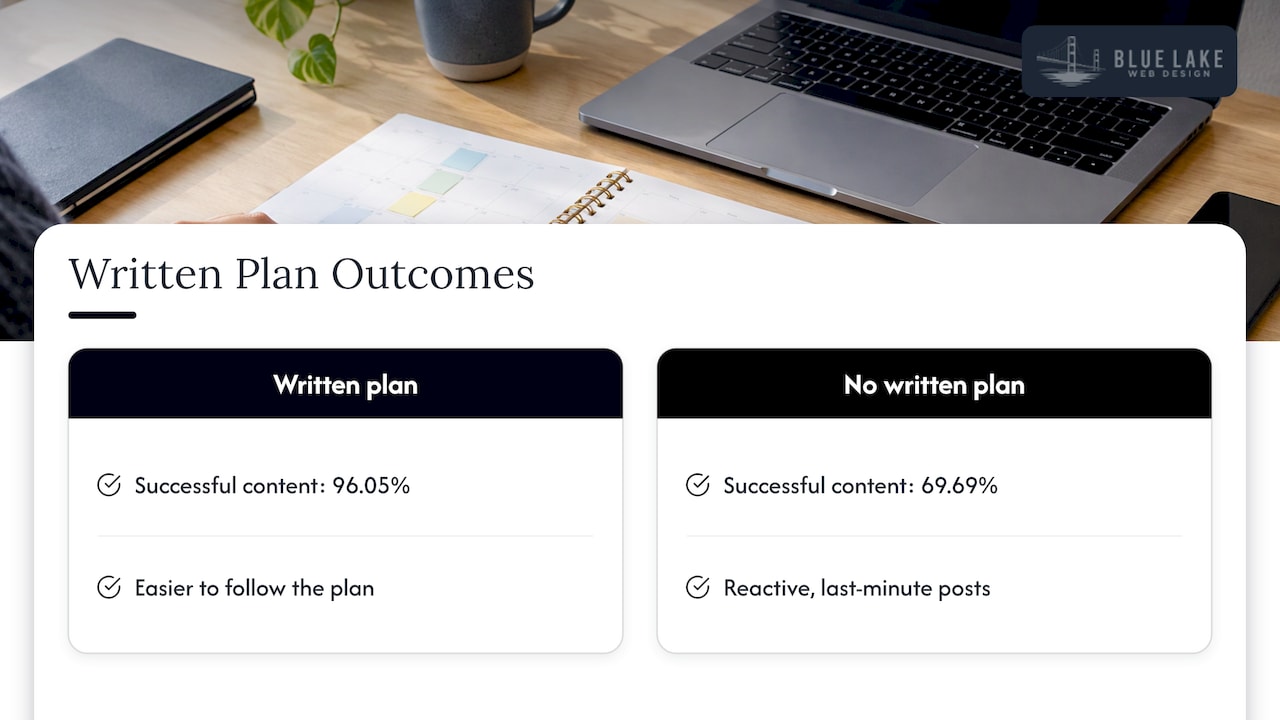
Planning also seems to go along with better outcomes. A 2022 survey of 702 US small business owners and managers found that 96.05% of those with a written content plan said their content was successful, compared with 69.69% of those with no written plan. That is one survey, and it shows a link, not a guarantee. But it fits what most owners find: writing the plan down makes it easier to follow.
What to put in your calendar
Keep it small. A calendar with fifteen columns will not get used. Here is a starting set that works for most small businesses:
| Column | What goes in it | Example |
|---|---|---|
| Date | The day it goes live | Tuesday, March 3 |
| Where | Facebook, Instagram, email, blog, Google Business Profile | Google Business Profile |
| Topic | One line on what it is about | Three signs your furnace needs service |
| Type | Photo, short video, article, offer | Short video |
| Status | Idea, drafted, scheduled, posted | Drafted |
| Next step for the reader | Call, book, visit, read more | Call for a tune-up |
Other guides suggest adding an owner for each task, target keywords, and links to photos or files. Add those only if you have a team or you write blog posts that you want people to find through search engines. A keyword is simply the words a customer types into Google. If you want help finding them, our guide on finding the keywords your local customers search for shows how.
How to build your calendar in one afternoon
Step 1: Pick one or two places to post
It is tempting to be everywhere. Resist that. Look at where your customers already spend time: do they find restaurants on Instagram, ask neighbors on Facebook, or search Google when a pipe bursts? Strong advice from content specialists is to keep a strong presence on one or two channels rather than struggling across five. Add email if you have a customer list, because those people already know you.
If you serve a local area, your Google Business Profile deserves a spot on the calendar. Search Engine Land’s guide recommends posting a new Google Business Profile update at least weekly to promote offers, new products, or seasonal services.
Step 2: Choose three kinds of posts
If every post says “buy now,” people tune out. If none do, you get no calls. A simple mix of three kinds of posts keeps you balanced:
- Teach: answer a question customers ask. How long does a roof repair take? What should I bring to a first appointment?
- Show: your work, your team, your shop, a finished job, a new arrival on the shelf.
- Offer: what you sell, with a clear next step such as a phone number or booking link.
A good starting ratio is roughly three helpful or friendly posts for every one that sells. Adjust it after a few months, based on which posts lead to calls and messages.
Step 3: Collect topics from your real day
The best source of topics is not a brainstorm. It is your own week. Write down every question you hear on the phone, in email, or at the counter. Each one is a post, and many are strong blog articles, because other people are typing that same question into Google.
Other good inputs are:
- Seasons and holidays that change what your customers need (snow tires, tax season, graduation, back to school)
- Local events, festivals, and street fairs in your town
- Photos of recent work, with the customer’s permission
- Common themes in your Google reviews
- Changes in your hours, staff, or stock
One rule: only post what is true. If you cannot back up a claim, leave it out or soften it. Do not make up a customer story to fill a slot.
Step 4: Set a pace based on your worst week
There is no magic number of posts. The right rhythm is the one you can keep for a year. A realistic plan for a busy owner might be:
- Two posts a week on Facebook or Instagram
- One Google Business Profile update a week
- One or two emails a month
- One blog article a month
If your worst week is a holiday rush or a full schedule of jobs, plan for that week. Large guides recommend more, such as two to three blog posts a week and daily social posts, but those numbers are written for companies with a marketing team. It is better to publish one good post a week on schedule than to plan daily posts and burn out after a month. Start modest, and raise the pace once it feels easy.
Step 5: Fill in four weeks, starting with fixed dates
Open your spreadsheet and first mark the dates that will not move: holidays, sales, events, and any busy or slow seasons. Then place your three kinds of posts around them, rotating so no two “offer” posts land back to back. Leave a few open slots for surprises, like a great customer photo or a last-minute special.
Plan far enough ahead that nothing is rushed. A common recommendation is to plan at least four to six weeks ahead and to mix content that is always useful with content tied to a season or event. For anything with a deadline, such as a holiday promotion, work backward from the date. Search Engine Land suggests allowing 2 to 3 days to plan, 5 to 7 days to create, and 3 to 4 days to review, plus at least a 20% buffer. For a short social post you will need far less, but the buffer idea holds: add a cushion.

Step 6: Batch the work
Instead of creating a post every morning, set aside one block each week, perhaps an hour, to write and schedule the next week’s posts together. Take your photos in one session. Reuse one idea in several places: a customer question becomes a blog article, then a short social post, then an email, then a line in your frequently asked questions page.
Which tool should you use?
For most small businesses, a free spreadsheet is enough. Google Sheets works well as a shared calendar for a two-person team. If you like boards with cards you can drag from “idea” to “posted,” project tools such as Trello and Asana have free plans. As of an October 2026 pricing check, Trello was free for up to 10 collaborators and Asana’s personal plan was free for one or two people. Prices change, so check the provider’s page before you sign up.
Whatever you pick, the test is simple: will you open it every week? A plain tool you use beats a clever one you forget.
Keep it going: a 45-minute monthly check
A calendar goes stale if nobody tends it. Once a month, spend about 45 minutes on four jobs:
- Look back (10 minutes). Which posts led to calls, messages, or bookings? Do more of those.
- Check the dates (5 minutes). Look at next month’s holidays and local events.
- Fill the month (20 minutes). Rotate your three kinds of posts into the open slots.
- Reuse (10 minutes). Turn last month’s best post into two new versions, in a different format or place.
A rolling view helps too. Sketch the next three months roughly, then fill in the detail one month at a time. That way you can still react to news without throwing out the plan.
Where your website fits in
Social posts disappear from feeds within days. Your website does not. Every post, email, and Google Business Profile update should point somewhere: a page that explains your services, shows your prices or process, and makes it easy to call or book. If that page loads slowly or is hard to read on a phone, the calendar’s work is wasted.
This is also where blog articles earn their keep. An article that answers a local customer’s question can be found through search engines for a long time. Articles like that are called evergreen content, and our page on evergreen content examples for small businesses shows what they look like. If you are wondering how much to write, see how long a blog post should be for search engine optimization. Search engine optimization, or SEO, simply means making your pages easier for Google to understand and show to the right people.
If you are a local retailer or service business, link your posts to pages built for your town and your customers. Our guide to fast local landing pages for small businesses explains how speed and clear layout help visitors become customers.
Do it yourself, or get help writing?
Most owners can build the calendar themselves in an afternoon and keep it up with an hour or two a week. The part that takes longer is writing articles and web page copy that is clear, accurate, and written with search in mind. When that falls behind, the calendar fills with empty slots.
That is the point at which we offer content creation and search writing in Michigan. You keep the calendar and your knowledge of your customers. We write the pieces that need more time than you have.
Why we plan content around the website first
Over the years I have watched small business owners put weeks into social posts that lead to a website that does not do its job. I think that gets the order backward.
At Blue Lake Web Design, we build the website first, and we build it to load fast and to include search optimization from the start. Then every blog article, every Google Business Profile update, and every email has a clear place to send people. A content calendar works best when it feeds a site that is ready for visitors.
We also believe you should know what you are paying for. That is why we give fixed-price quotes, with no contracts and no hidden fees. Business owners should be able to focus on running the business, not decoding an invoice.
Eric Plotts
Need a website worth posting about?
If your site is old, slow, or missing the pages your content should point to, start there. Our three-page website is $899 and our eight-page website is $1,999. Anything larger gets a fixed quote. Websites are typically finished in about two weeks, with no contract. You can see what is included on our website design pricing page.

We are in Novi, Michigan, and we work with businesses across Metro Detroit and Oakland County. To talk through your site or your content, call us at (248) 800-1855 or visit Blue Lake Web Design.
FAQ
How far ahead should a small business plan its content?
Plan four weeks in detail and the next three months in rough form. Planning at least four to six weeks ahead gives you time to write, take photos, and proofread. Update the plan once a month so it stays accurate.
How often should a small business post?
Choose the pace you can keep during your busiest week. For many owners that is two social posts a week, one Google Business Profile update a week, and one email or blog article a month. Start there and add more only when it feels easy.
Do I need a blog for my content calendar?
No, but a blog gives you pages that can be found through Google long after you publish them. If you have no time to write, start with social posts and Google Business Profile updates, and add articles later. Our content creation service is there if you want articles written for you.
What is the easiest free content calendar?
A Google Sheets spreadsheet with columns for date, place, topic, type, status, and the next step for the reader. It is free, you can share it with a partner or employee, and you can open it on your phone. Free boards in project tools also work if you prefer cards to rows.
What should I post about if I run out of ideas?
Go back to customer questions. Write down what people ask you this week and answer each one in a post. Seasonal needs, local events, photos of recent work, and themes from your reviews are other reliable sources. You can read more on our web design and SEO articles page for ideas.
Recommended
Written by
Eric Plotts
Web designer and SEO consultant in Novi, Michigan. Building websites for small and mid sized businesses since 2011.More about Eric.